1. Introduction
Why Google Maps Doesn’t Work Well in Korea
If you're planning a trip to Korea, you might be surprised to find that Google Maps doesn’t work well here. Due to government regulations, Google Maps lacks turn-by-turn navigation and often provides outdated or incomplete information.
So, what’s the best alternative? Naver Maps! This guide will show you how to download, set up, and use Naver Maps for smooth navigation in Korea.
2. Why You Should Use Naver Maps in Korea
Key Features of Naver Maps
* Accurate public transportation routes (subway, buses, taxis)
* Turn-by-turn navigation (Google Maps doesn’t have this!)
* Real-time traffic updates
* English interface available
* Street View (Road View) feature
3. Naver Maps vs. KakaoMap – Which One is Better?
| Feature | Naver Maps | KakaoMap |
|---|---|---|
| Navigation | ✅ Best for public transport & driving | ✅ Great for walking routes |
| English Support | ✅ Yes, but some Korean labels remain | ❌ Limited English |
| Real-time Traffic | ✅ Yes | ✅ Yes |
| Street View | ✅ Yes (Road View) | ✅ Yes |
| Ease of Use for Tourists | ⭐⭐⭐⭐ | ⭐⭐⭐ |
Verdict: If you're traveling in Korea, Naver Maps is the best option for tourists, especially for subway and bus directions.
4. How to Download & Set Up Naver Maps
Step 1: Download the App
- iOS: App Store
- Android: Google Play Store
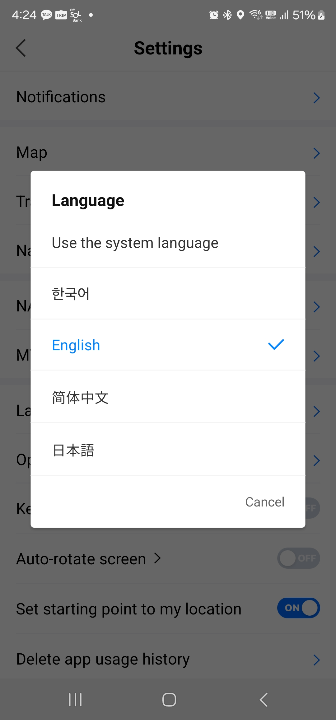
Step 2: Change the Language to English
- Open Naver Maps
- Tap on the Menu (☰) > Settings
- Select Language > English
Step 3: Create a Naver Account (Optional)
- You can use the app without an account, but signing in allows you to save locations and routes.
5. How to Search for Locations on Naver Maps
(1) Searching for Hotels, Restaurants, & Attractions
* Use English names (e.g., "Gyeongbokgung Palace")
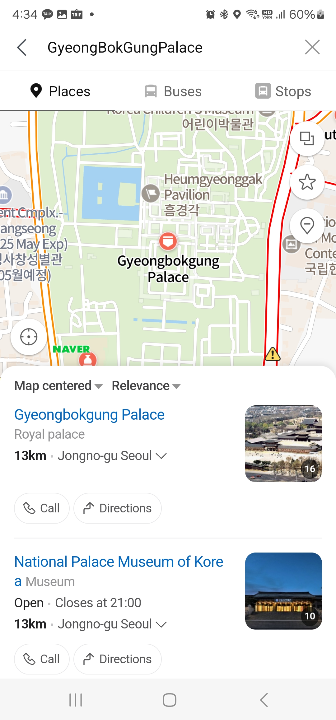
* If the English name doesn’t work, try the Romanized Korean name (e.g., "Myeongdong Gyoja")
* Copy-pasting Korean names (from Google) also helps!
(2) How to Get Accurate Public Transport Directions
* Enter your starting point and destination
* Choose subway, bus, taxi, or walking options
* Tap ‘View Details’ to see exact routes & times
6. How to Use Naver Maps for Navigation
(1) Walking & Driving Directions
- Tap "Directions" and choose "Walk" or "Drive"
- The app will guide you with turn-by-turn voice navigation
(2) Subway & Bus Route Finder
- Tap "Public Transport"
- Select your subway/bus departure time
- Get real-time arrival & departure updates
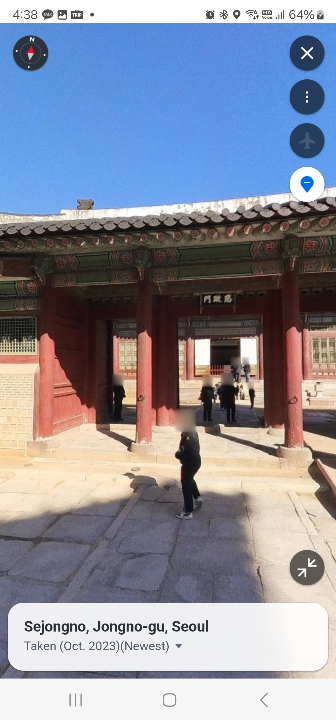
(3) Using Street View (Road View)
- Long-press on any location
- Tap "Road View" to explore the area with 360° images
7. Pro Tips for Using Naver Maps in Korea
* Save your hotel & favorite places for quick access
* Use the "Bookmark" feature to organize travel spots
* Share locations with friends via KakaoTalk or WhatsApp
8. Conclusion & Final Travel Tips
If you're visiting Korea, Naver Maps is essential for navigation. It offers accurate directions, real-time updates, and an easy-to-use interface. Make sure to download it before your trip and get familiar with the app!
Planning your trip to Korea? Check out our 2025 Korea Cherry Blossom Guide!
"Cherry Blossom Korea 2025 – Best Time, Locations & Full Bloom Dates"/>
"Cherry Blossom Korea 2025 – Best Time, Locations & Full Bloom Dates"
1. Introduction – Why Visit Korea for Cherry Blossoms?Spring in Korea is a magical season, with streets and parks covered in beautiful pink cherry blossoms. If you’re planning a trip in March or April, you’re in for a treat!But when and where should
theriches400.waldebe.com